

Running a roofing business isn’t just about installing shingles or replacing old roofs. A big part of the job happens before anyone even climbs a ladder. Estimating materials, scheduling crews, tracking project progress, and keeping customers informed all take time.
For years, many roofing contractors managed everything with notebooks, spreadsheets, phone calls, and plenty of sticky notes. It worked—at least most of the time. But today, roofing planning software has changed how many companies handle their daily operations.
So, which approach is actually better? The answer depends on your business, but let’s look at both sides.
Manual Planning: Simple but Familiar
Many experienced roofing contractors still prefer manual planning because it’s what they’ve always used. There’s nothing wrong with that.
A notebook doesn’t crash. A whiteboard doesn’t require software updates. And you don’t need internet access to check your schedule.
Small roofing businesses with only a few employees often find manual planning easy enough. If you’re handling just a handful of projects each month, keeping track of everything may not feel overwhelming.
That said, manual systems usually depend on one thing: memory.
If one person forgets to update the schedule or misplaces an estimate, the whole project can slow down.
Where Manual Planning Starts to Struggle
As roofing companies grow, so do the moving parts.
Now you’re managing multiple crews, ordering materials for different jobs, coordinating inspections, answering customer questions, and trying to keep every project on schedule.
That’s when paper notes and spreadsheets can become frustrating.
A common example looks something like this:
One crew arrives at a job site only to discover the materials haven’t been delivered. Another customer calls asking why nobody showed up because the appointment time wasn’t updated after a weather delay.
None of these problems happen because people don’t work hard. They happen because information gets lost between different systems.
What Roofing Planning Software Brings to the Table
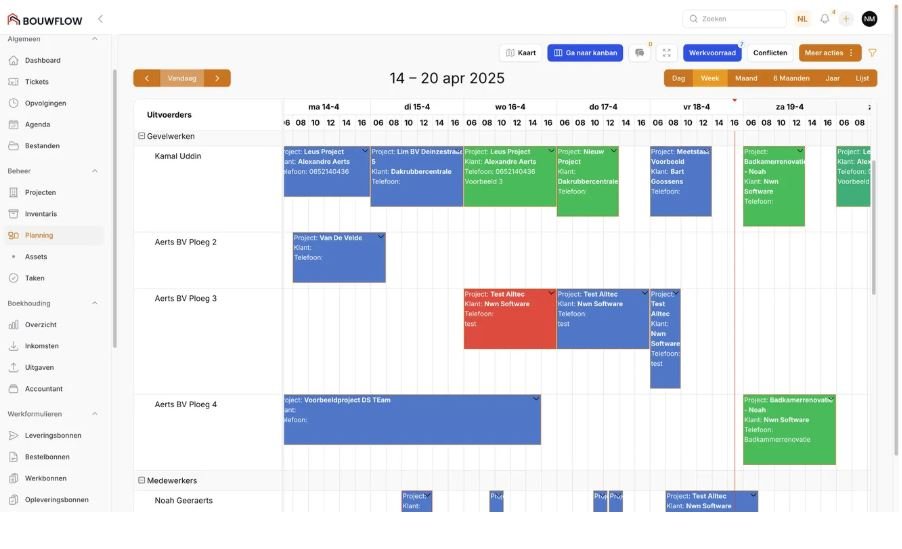
Roofing planning software puts everything in one place.
Instead of switching between emails, spreadsheets, calendars, and notebooks, contractors can manage projects from a single dashboard.
Depending on the platform, you may be able to:
- Schedule crews
- Track project progress
- Generate estimates
- Store customer information
- Monitor material orders
- Upload job-site photos
- Create invoices
- Send automatic reminders
This doesn’t replace good project management—it simply makes it easier.
Saving Time Every Day
One of the biggest advantages isn’t necessarily doing more work.
It’s spending less time organizing work.
Imagine updating tomorrow’s schedule once instead of calling every crew individually.
Or changing a project date and having everyone see the update immediately.
Those small time savings add up over weeks and months.
Instead of chasing paperwork, your team can focus on completing roofing projects.
Reducing Costly Mistakes
Mistakes are expensive in roofing.
Ordering the wrong materials, double-booking a crew, or forgetting a permit can delay projects and reduce profits.
Software doesn’t eliminate every error, but it helps reduce them by keeping information organized and easy to access.
When everyone works from the same schedule, there’s less confusion.
Better Communication with Customers
Customers appreciate knowing what’s happening.
If weather delays a project, they want updates.
If the crew is arriving tomorrow morning, they want confirmation.
Many roofing planning platforms include customer communication tools that make updates faster and more consistent.
That creates a better experience without adding extra administrative work.
Aso Read: Cloud ERP for Roofing Companies
Is Software Worth the Investment?
For a very small roofing company completing only a few jobs each month, manual planning may still be enough.
But once projects increase, software often pays for itself through better organization and fewer scheduling mistakes.
The value isn’t only about technology.
It’s about reducing stress for everyone involved.
Owners spend less time tracking information.
Office staff answer fewer confused phone calls.
Field crews know exactly where they’re supposed to be.
Customers stay informed throughout the project.
The Learning Curve
One concern many contractors have is learning new software.
That’s understandable.
No one wants to spend weeks figuring out complicated tools.
The good news is that many modern roofing platforms are designed with contractors in mind. Most offer simple dashboards, mobile apps, and step-by-step onboarding.
Like any new system, there’s an adjustment period, but most teams become comfortable after using it regularly.
Can You Combine Both Approaches?
Absolutely.
Some roofing companies still use printed schedules alongside digital software.
Others keep handwritten notes during inspections but upload everything into the system afterward.
The goal isn’t to eliminate every traditional method.
It’s to build a workflow that’s organized, efficient, and easy for your team to follow.
Final Thoughts
Manual planning has helped roofing businesses succeed for decades, and for very small operations, it may still be a practical choice.
However, as projects become more complex and customer expectations continue to rise, roofing planning software offers clear advantages. Better scheduling, centralized information, improved communication, and fewer administrative headaches can make a noticeable difference in day-to-day operations.
At the end of the day, the best planning system is the one that helps your team stay organized, complete projects on time, and deliver a great experience for every customer. For many growing roofing companies, that increasingly means making the move from manual planning to a modern digital solution.
